
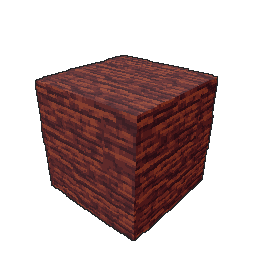
The material applied across a face. Preview settings do not change the download.
Wood / Material
Boat Wood
Broken wood grain captured from a hand-painted boat. Brush it around your model or apply it across a face, using your own colors and painted shading.
Downloads require active Creator Glove access.
Member download terms ↗- File
- .rfmaterial · 10.5 KB
- Compatibility
- Creator Glove beta37 or later
- Version
- 1.0
From download to your model
One material. Two ways to use it.
- Import your material
In Creator Glove, open PRESETS, choose Surfaces or Brushes, then Import. Select the downloaded .rfmaterial file.
- Fill a face or paint a stroke
Drag a surface onto a face, or select the material brush and paint across your model.
- Keep your colors and lighting
Auto color mode follows your painted base. Add your light and shade first, then apply the material detail.
In Blockbench
See the workflow.
Material capture, face application and continuous brush strokes. No audio.