Shared cube edges continue the brush grain, including rotated and mirrored UVs. Gaps between blocks start a separate segment; different texel densities can change detail scale. Painted results do not relight automatically. Mirror painting and tiled view are unsupported for material strokes. The online Creator Library is not part of this update. New material controls are currently English.
Your own material library
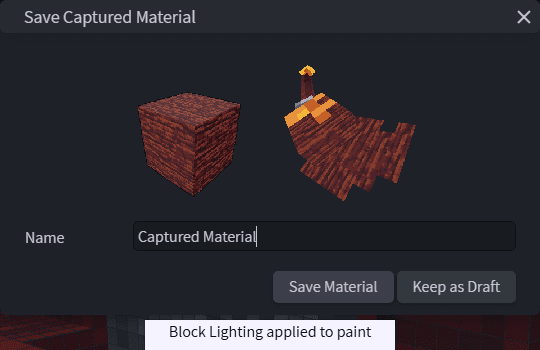
- +In PRESETS, click the capture camera and select a painted cube face. Preview your material, name it and save it. Brushes paints strokes; Surfaces applies the material to a face.
- +In Brushes, hold left-click to paint around cube corners and onto neighboring blocks, even across separate textures. Set the native brush lock to None to cross blocks. The entire drag uses one Undo.
- +Drag a surface onto a 3D face to preview its actual colors and lighting before dropping. The paint roller also enables hover-preview, then click to apply. Escape cancels.
- +Auto uses destination colors and painted shading. Choose a palette directly in the panel when you want extra colors, including highlights not yet painted on the model.
- +Save, rename, update, import and export local materials as .rfmaterial files. Choose Small, Medium or Large previews in the compact icon toolbar.
- ~Older surface presets remain available through Older surface presets. Material application respects existing texture layers, creates no extra layer and supports a single Undo.
Palettes and Shade Brush
- +Drag the active palette group's color row into the texture. A ghost shows placement; choose the size of each color swatch, with 4 by 4 pixels as the default.
- OKRight-click Shade Brush strokes use the right-hand shade in the UV and image editors instead of panning the view.